
FLEX TIME SCHEDULING SOFTWARE FOR SCHOOLS
School Scheduling Software
Manage flexible schedules at your school or district with Enriching Students® school scheduling software. Organize flex time periods, take attendance, and track analytics with powerful dashboards.
Use for: WIN Time | Flex Period | Genius Hour | RTI Time | Flex Block

FLEX TIME SCHEDULING SOFTWARE FOR SCHOOLS
School Scheduling Software
Manage flexible schedules at your school or district with Enriching Students® school scheduling software. Organize flex time periods, take attendance, and track analytics with powerful dashboards.
Use for: WIN Time | Flex Period | Genius Hour | RTI Time | Flex Block
Manage Schedules at…
Some Schedules We Help Schools Manage
Our flex scheduler is specifically designed to help manage flexible schools schedules, not entire master schedules. Use it to schedule flex periods, WIN Time, enrichment, intervention, etc. You can use Enriching Students® to schedule students to a variety of flexible time periods, get some ideas below (and get more ideas for different types of flexible schedules here)!
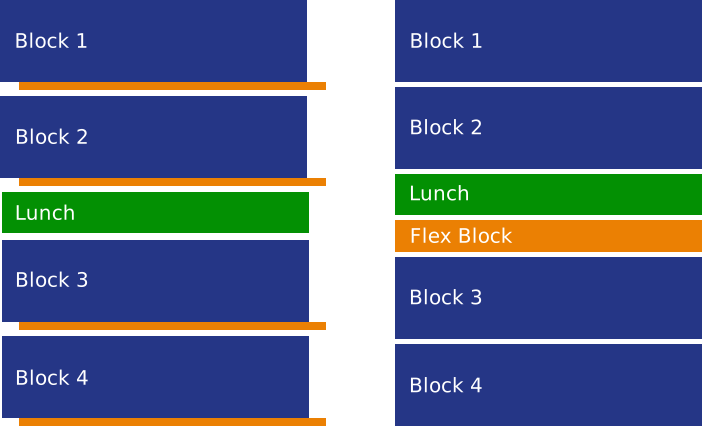
Traditional Period or 4×4 with a Flex Block
A classic 4×4 blocks is made more flexible with a flex block. Some schools take a few minutes from each block to create the flexible time period. You can use Enriching Students® to schedule students to this flex block, perhaps even breaking into a few different flex blocks if it’s long enough. This same concept would apply to any other traditional schedule, like a 7 Period Schedule.
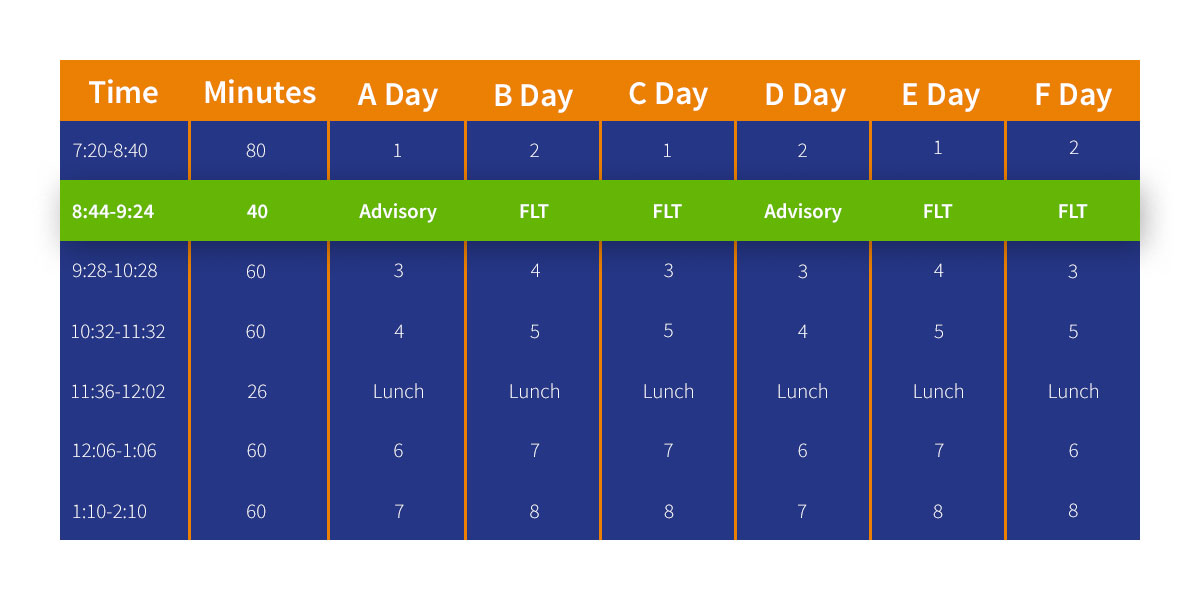
Rotating Flex Schedule
Many schools use a rotating schedule, things like A Days and B Days, or even a complex rotating drop schedule. Enriching Students® can be customized to work with this as well. For example, you may want to schedule students to flex intervention on A Days, advisory on B Days, and Genius Hour every Friday. This scheduling can be done manually or with our custom automation.

Advisory Model
Many schools adopt an advisory period into their weekly schedule, and we’ve seen this work well. You can create a ‘Mentor Monday’ where students meet with the same group and teacher every Monday to plan their week. Then, they attend flex periods at the same time on other days to get needed support or attend enrichment/extension.
Some Schedules We Help Schools Manage
Our flex scheduler is specifically designed to help manage flexible schools schedules, not entire master schedules. Use it to schedule flex periods, WIN Time, enrichment, intervention, etc. You can use Enriching Students® to schedule students to a variety of flexible time periods, get some ideas below (and get more ideas for different types of flexible schedules here)!
Traditional Period or 4×4 with a Flex Block
A classic 4×4 blocks is made more flexible with a flex block. Some schools take a few minutes from each block to create the flexible time period. You can use Enriching Students® to schedule students to this flex block, perhaps even breaking into a few different flex blocks if it’s long enough. This same concept would apply to any other traditional schedule, like a 7 Period Schedule.
Rotating Flex Schedule
Many schools use a rotating schedule, things like A Days and B Days, or even a complex rotating drop schedule. Enriching Students® can be customized to work with this as well. For example, you may want to schedule students to flex intervention on A Days, advisory on B Days, and Genius Hour every Friday. This scheduling can be done manually or with our custom automation.
Advisory Model
Many schools adopt an advisory period into their weekly schedule, and we’ve seen this work well. You can create a ‘Mentor Monday’ where students meet with the same group and teacher every Monday to plan their week. Then, they attend flex periods at the same time on other days to get needed support or attend enrichment/extension.
Scheduling Data for Your School and District
Campus Reports & Student Profile
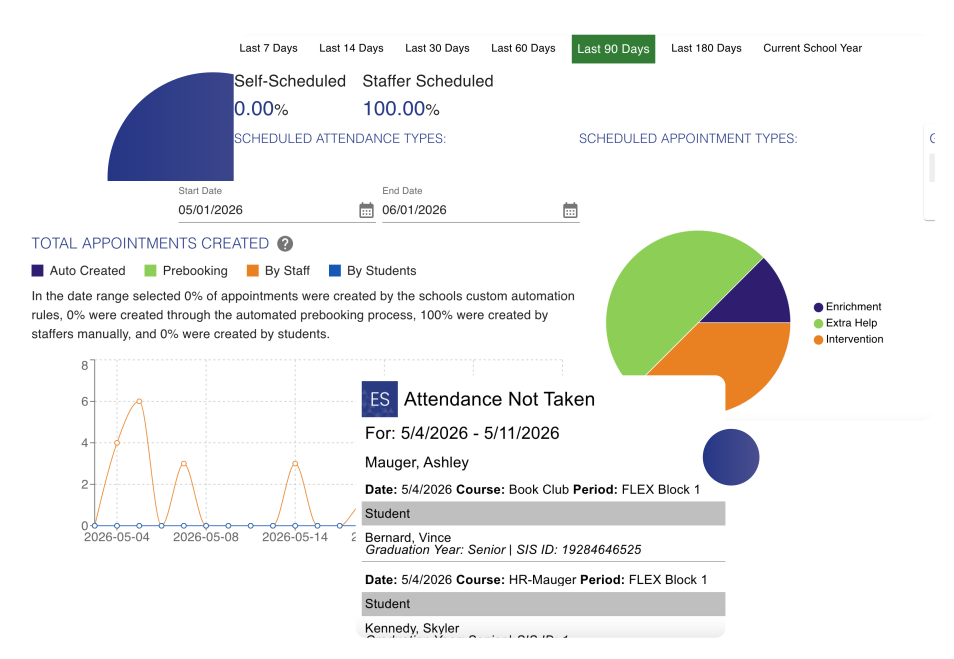
All staff can access some analysis reports about how flex is being used, as well as the Student Profile. This shows how a student is being scheduled for flex time, their attendance, and even how grades are being impacted. Parents can access the Student Profile page, and students can view some of their profile data as well. Who has access to this data can be managed by an admin user at your school. Admin users have access to the School Overview, which shows data snapshots about the school overall across different date ranges.
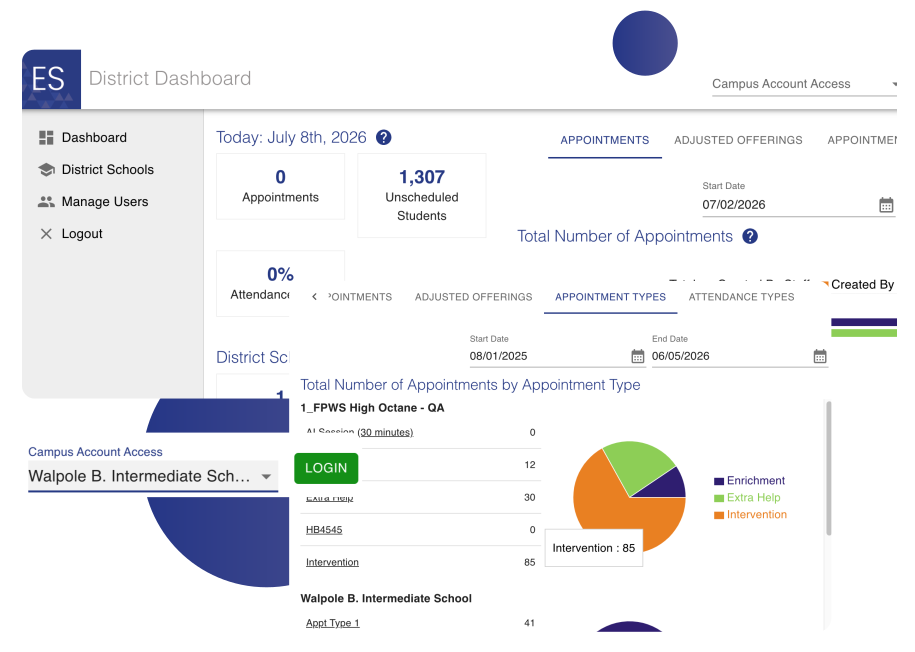
The District Dashboard
If you are using Enriching Students® at multiple campuses, or your entire District, you may want to have some district admin users. These can access multiple campuses and view data across all of them, on the District Dashboard. The District Dashboard allows them to login into a campus, and switch between different campuses. They can view data granularly for one school, or get a bigger picture of how the district is being impacted by its flex schedules by viewing data for all campuses. They can see things like the types of appointments being scheduled, attendance, which types of users are logging in, if students are self-scheduling, and more.
Scheduling Data for Your School and District
Campus Reports & Student Profile
All staff can access some analysis reports about how flex is being used, as well as the Student Profile. This shows how a student is being scheduled for flex time, their attendance, and even how grades are being impacted. Parents can access the Student Profile page, and students can view some of their profile data as well. Who has access to this data can be managed by an admin user at your school. Admin users have access to the School Overview, which shows data snapshots about the school overall across different date ranges.
The District Dashboard
If you are using Enriching Students® at multiple campuses, or your entire District, you may want to have some district admin users. These can access multiple campuses and view data across all of them, on the District Dashboard. The District Dashboard allows them to login into a campus, and switch between different campuses. They can view data granularly for one school, or get a bigger picture of how the district is being impacted by its flex schedules by viewing data for all campuses. They can see things like the types of appointments being scheduled, attendance, which types of users are logging in, if students are self-scheduling, and more.
Let’s build a path to close the learning gap and enrich students’ futures.
Imagine a flexible daily schedule with Teachers and Students completely in sync.
To give students the time they need, you also need a schedule that works.
Here are some resources we can share.



A flex block is a flexible time period set aside in the school day that gives students time for extra help or enrichment opportunities. In addition, it allows them to pursue topics and activities that interest them. Why should your school consider adding a flex block?
Make Learning Personal for Every Student, No Matter the Size of Your School!
Even More Reasons to Love Enriching Students®!

Easy to Use
Enriching Students® was designed to be intuitive, and easy to use every day. Make scheduling simple and efficient!

Minimal Impact on IT
Many of our processes are automated, and we’ll handle the back end for minimal impact on your school’s IT department.

Student Data Security
Our secure system will keep student data safe, and we will never use or sell student data for marketing purposes.

Backups
We back up your data, not only daily, but hourly, so you never have to worry about losing data.
DOWNLOAD FREE GUIDE
7 Features to Look For in a Flex Scheduling Tool