

Planning a School Career Day
Planning a school Career Day can be simple with Enriching Students® flex scheduling and event management options. If you’ve been tasked with coordinating a career day, or want some ideas on how to do it, we’re going to take look at each step, and how you can do it in Enriching Students® (as well as some useful tips even if you don’t plan on using our tool).
First, let’s talk about examining some key data before you begin.

Planning a School Career Day
Planning a school Career Day can be simple with Enriching Students® flex scheduling and event management options. If you’ve been tasked with coordinating a career day, or want some ideas on how to do it, we’re going to take look at each step, and how you can do it in Enriching Students® (as well as some useful tips even if you don’t plan on using our tool).
First, let’s talk about examining some key data before you begin.
TL;DR
Want the quickest answer? You can use Enriching Students® to plan your career day by looking at data to determine student interests and gaps, and creating events for each aspect of the career day. You can make the events available to students in Enriching Students®, track signups, and check them in to provide important attendance data later on. If you’re running shorter career learning workshops during your flex period, you can also opt to use our Adjsuted Offerings page. Check out the video for a brief demo on creating a Career Day event!
If you want more details on Career Day planning and what works for other schools, read more below.
TL;DR
Want the quickest answer? You can use Enriching Students® to plan your career day by looking at data to determine student interests and gaps, and creating events for each aspect of the career day. You can make the events available to students in Enriching Students®, track signups, and check them in to provide important attendance data later on. If you’re running shorter career learning workshops during your flex period, you can also opt to use our Adjsuted Offerings page. Check out the video for a brief demo on creating a Career Day event!
If you want more details on Career Day planning and what works for other schools, read more below.
Start with Your Students
In Enriching Students®, you can leverage student data within to system to plan career days, create a career day event, track signups, and provide an enriching student experience. Let’s go through the steps of how you can do this in Enriching Students®, including some tips even if this isn’t a tool you plan to use.
If you’ve been tasked with coordinating a career day at your school, the biggest item on your mind might be to find presenters and align schedules to bring everyone to your school.
But even before that step, you need to consider students. What do the students at your school need the most? Where are their gaps? What are their interests? Are there specific groups of students, even if they are small, that have a specific aptitude or skill? This will help you decide who to invite to guest speak. Meet with teachers and other staff who regularly work with students to get ideas and anecdotal data. Then, look at the numbers.
What numbers? The appointments students are scheduled to for Flex Time is a great place to start. If your school uses Enriching Students® to manage its flex period/WIN Time/advisory/enrichment time, etc., you will likely have data about the kinds of appointments students are scheduled to.
If you have students often going to science enrichment activities, like Robotics, you know there is an interest there. Or maybe you have a size-able population who need regular Math Intervention. That could be a gap.
For example, maybe you notice that while there is an interest in robotics, students math proficiency could be better. So maybe you try to find guest speakers who have a STEM career that could help inspire students, answer their questions, and offer support related to this career path.
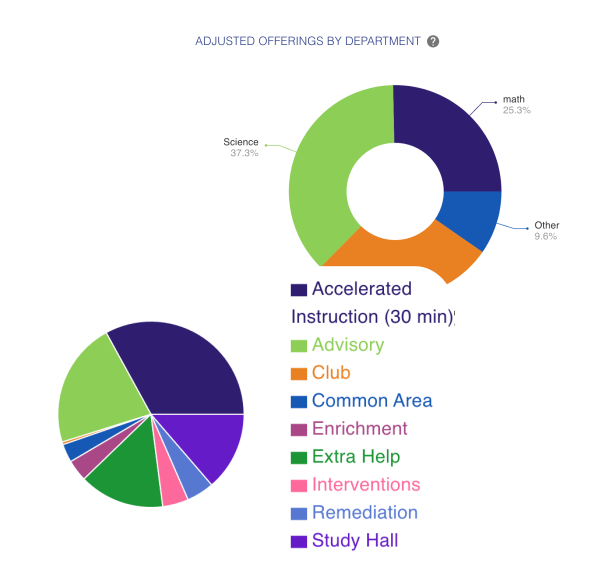
You can uncover this data in Enriching Students® on student profile pages and through reports. You can also use your school’s current assessment tools, and good old fashioned surveys to get student feedback. Now it’s time for the next step!
Finding the Best Time for a Career Day
There are a few different ways schools run Career Days. Some plan ahead to block out an entire school day. On this day students may be able to attend a sort of career fair, visiting different booths local business have set up in the gymnasium. They might attend resume-building workshops or mock interviews. They may also have the option to listen to guest speakers who present about their career and answer any questions students may have.
A school could make one of these their focus, or combine them during one Career Day, allowing students to sign up for different activities ahead of time.
Another option some schools use for a Career Day is to repurpose their flex or advisory period. While this isn’t a full day, it still provides a block of time for teaching these skills and hosting career learning sessions. This could work well for a guest speaker series – a teacher hosts a guest career speaker during Flex Block, and interested students can sign up to attend. This is the approach used by Hudson High School, who uses Enriching Students to schedule flex activities, including career speakers. We’ll discuss some tips from them in the next section.
Once you’ve planned what to include in your school career day, and how it’s going to be structured, you’re going to want to invite relevant businesses. At many schools, career day involves guest speakers and presenters. So, next up: how to invite guest speakers.
Inviting Guest Speakers and Presenters
Looking at data and identifying student interests can help you narrow down the types of guest speakers or presenters you would like to invite. Combine this with who you know; local businesses and past alumni are a great place to start.
That’s what Hudson High School did. The advice of educators Whitney Nielsen and Gretchen Jahns is to not overcomplicate things, especially when you’re getting started. (And if you can, check out their full presentation from MassCUE’s 2026 Fall Conference.)
First, they recommend that you know your visitor procedure. Communicate this to your guest, and make your ask very clear. How long will they be at your school, and when? School hours and business hours are usually very different. Make sure you are giving them enough notice to be able to commit to the time.
Then, make sure that they know what to expect, especially if they’re not used to speaking with students. Do they need to prepare a presentation? Will you provide any questions or other materials? Is there anything students need to do to prepare?
In some cases, you might be able to use video conferencing. While this may not be as engaging for students, it can be a good way to connect with someone across the globe.
Chicago Public Schools has a great resource that might be able to assist with your planning. They have a toolkit for planning career days at their school covering everything from how to coordinate it to employer tips to post-event student reflections. Could your school use it as some inspiration for creating your own?
Career Day Student Signups & Attendance
When it comes time to publish your career day and let students know about it, you could do so verbally through announcements or school newsletters, or maybe via a shared spreadsheet. If you use Enriching Students, you have a couple options for this built in.
If you are going to have more of a career workshop that occurs during flex time, instead of an entire day, you could simply create an adjusted offering for this for a teacher who could be the host.
Or, you could create an event. Events can be for any amount of time, but if you want to create an entire career day, this will be the best option. You could create the event for the school day, before or after school, or event on a weekend.
An admin user would set up a student event in Enriching Students, providing all the needed information, and then making it available to students.
Students could see it in their upcoming events when they log in, and RSVP by selecting if they will attend or not.
You could optionally make the event required for all students, so they would need to attend and as a result not have an RSVP option.
You could also set an ‘RSVP by’ date, meaning students have a limited time to decide if they will attend. This will help the guest speaker or organizer know exactly who to expect.
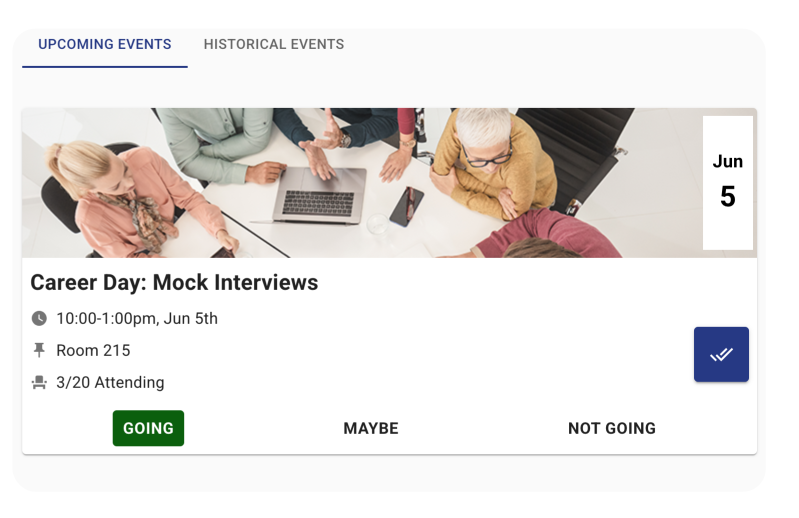
Students could see it in their upcoming events when they log in, and RSVP by selecting if they will attend or not.
You could optionally make the event required for all students, so they would need to attend and as a result not have an RSVP option.
You could also set an ‘RSVP by’ date, meaning students have a limited time to decide if they will attend. This will help the guest speaker or organizer know exactly who to expect.
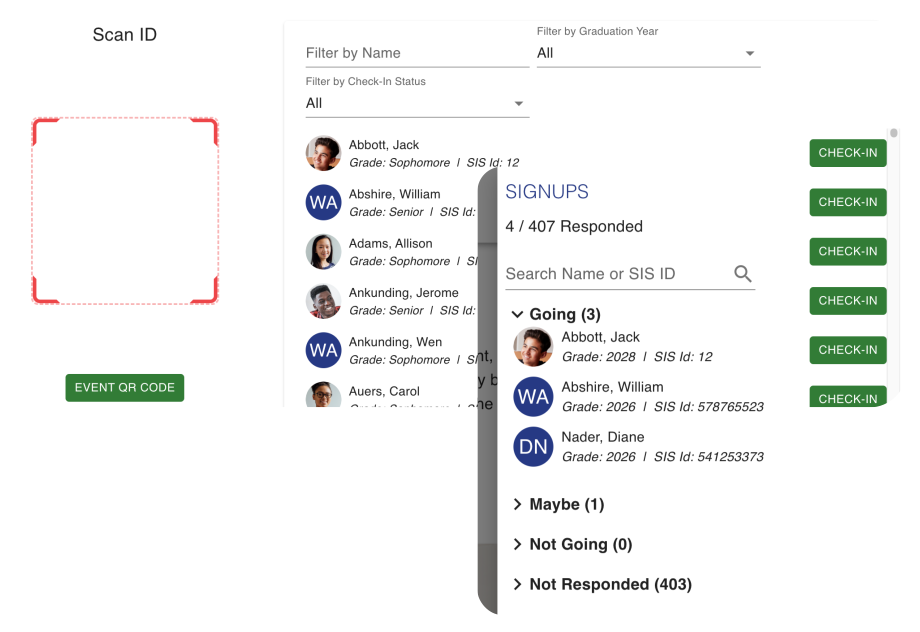
If the event has an RSVP option, admin users could monitor the event signups to see who is attending. Then, when the day arrives, the event manager would be able to check students in by scanning their badges or looking them up in the system, all within Enriching Students. This provides a way to take attendance for the event.
In addition, after the event, a report can be run to take a look at attendance.
If the event has an RSVP option, admin users could monitor the event signups to see who is attending. Then, when the day arrives, the event manager would be able to check students in by scanning their badges or looking them up in the system, all within Enriching Students. This provides a way to take attendance for the event.
In addition, after the event, a report can be run to take a look at attendance.
Want to see an example of this in real time? Check out our Enriching Students® career day planning tutorial to see an example of how it could work.
The Benefits of Planning a School Career Day
The benefit of a career day for students is that they can be exposed to a variety of careers and pathway after high school that they may not have considered. When you include career speakers who are local, this connects the classroom with the community and helps kids see the bigger picture, and see how people just like them have been successful.
This is was the motivation at Hudson High School. “A lot of kids didn’t really know what they wanted to do after high school,” shared Whitney Neilsen, “or didn’t have exposure to things outside of the classroom.”
Planning a school career day, or even simply career speakers during a flex period, can give students the exposure to different options in their community and beyond. They may be able to connect things they are already passionate about with potential career paths, and learn skills that will help them regardless of what path they take after high school.
To see how Enriching Students® can help you manage events at your school, schedule a demo here!